XgenPlus CRM / How it works

How XgenPlus CRM works

Every enquiry becomes a lead, every lead gets an owner and a next step, and every deal moves along one board to Won. Here is the whole path, who it suits and how to start.

Capture. Organise. Follow up. Win. Learn.

Every screen in CRM exists to move a lead one step along this path. The pictures are an invented example: a textile business called Sharma Textiles.

Step 1

Capture: every enquiry becomes a lead

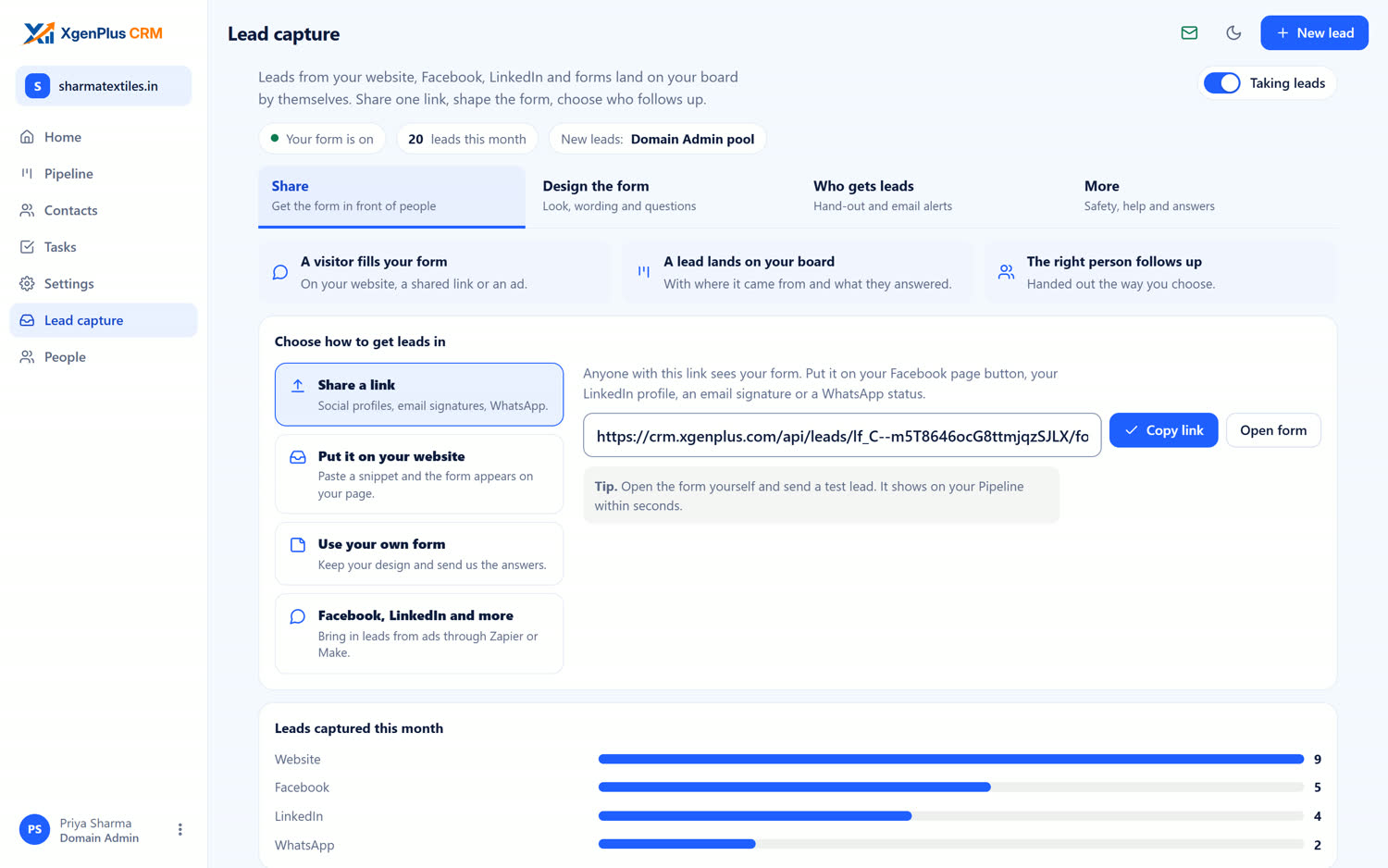
Leads arrive from wherever your customers are. Each company gets its own lead form and web address.

  • Share the link on Facebook, LinkedIn, WhatsApp or in an email signature, or put the form on your website.
  • Send leads from your own form, or from Facebook, Instagram, LinkedIn and Google ads through Zapier, Make or n8n.
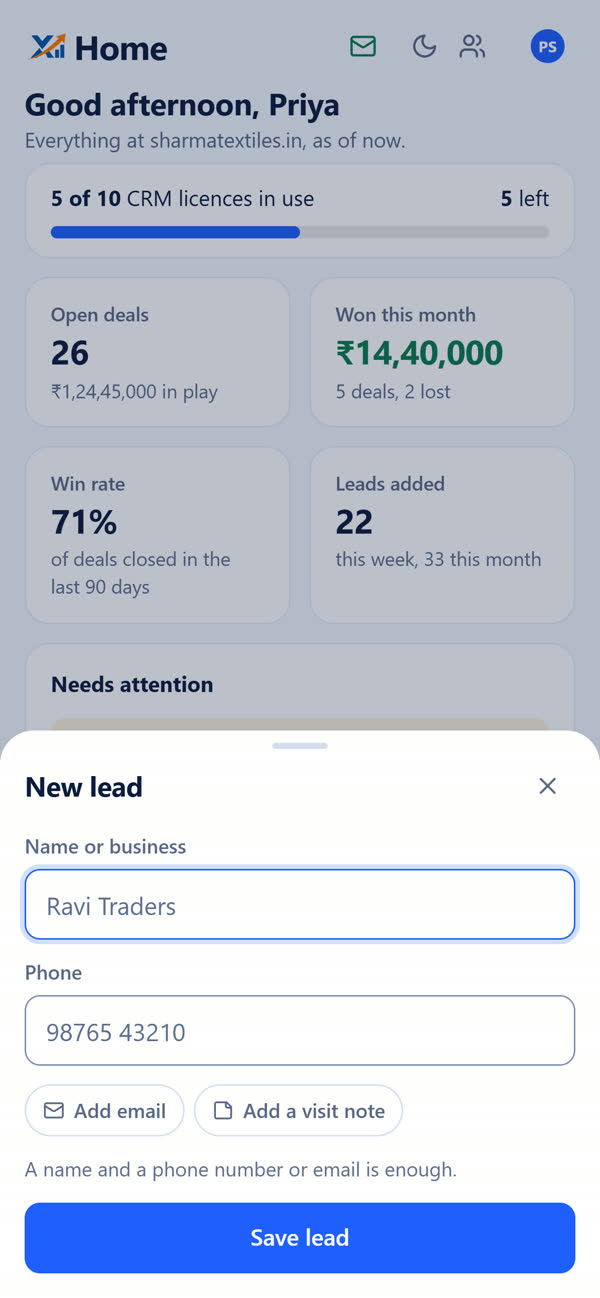
  • Anyone on the team can add a lead in seconds with the plus button, even without signal.
  • Each lead remembers where it came from, and the same person writing twice is not added twice.

Share your lead form in the help centre

The Lead capture screen showing the link to share, the ways to put the form on a website or use your own form, and where this month's leads came from.
Lead capture: one link and one form for your whole company.
Step 2

Organise: every lead has an owner and a stage

A new lead lands at the top of the first stage, New. You decide who owns new leads.

  • Either leads wait in the Domain Admin pool to be handed out, or they are shared in turn (round robin) among the people you choose.
  • The people in the round can be told by email the moment a lead arrives.
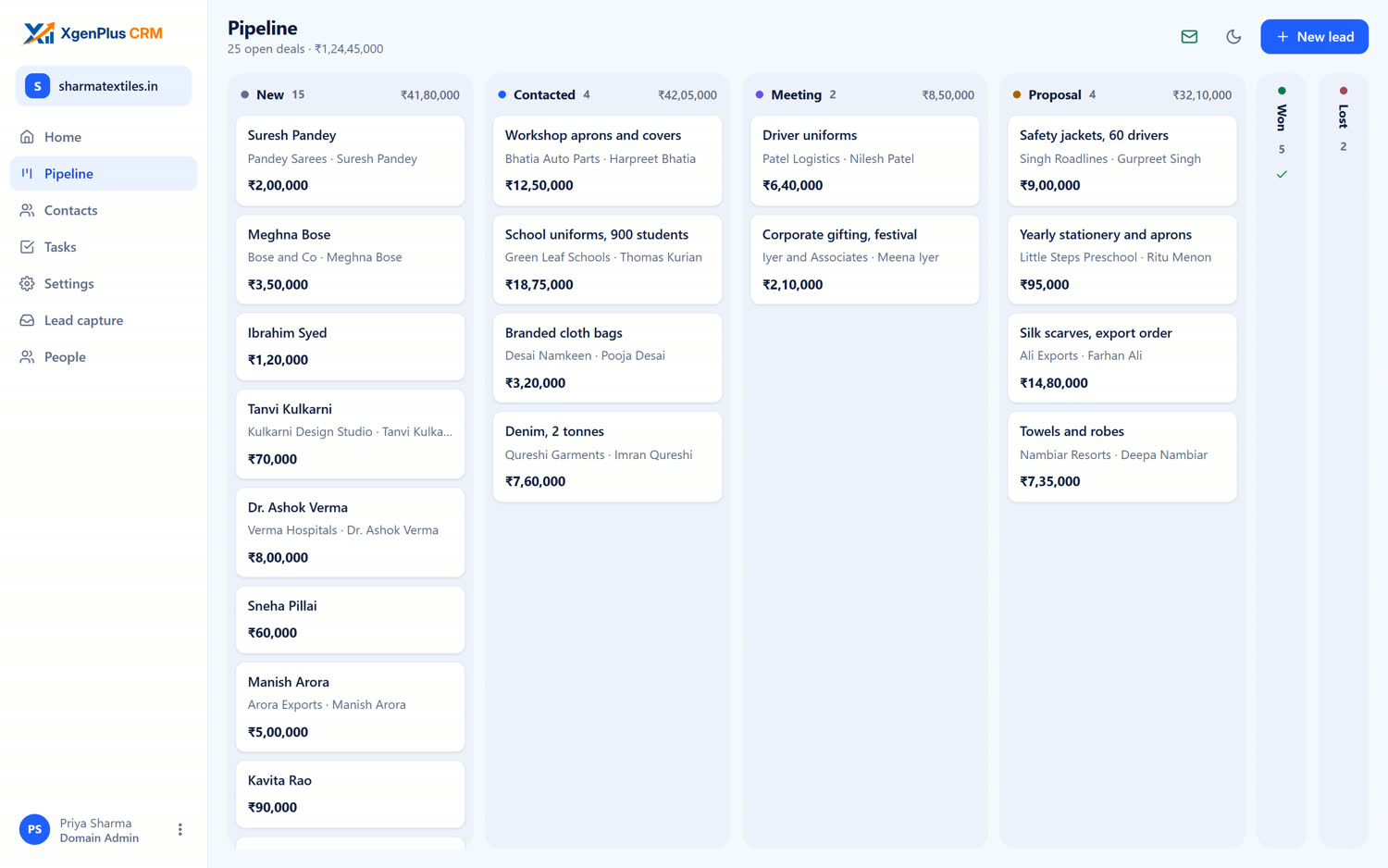
  • The board shows every stage with its count and its total value, so the state of your sales is visible at a glance.

Who gets new leads in the help centre

The pipeline board with deals in the New, Contacted, Meeting, Proposal, Won and Lost stages, each showing a count and a total in rupees.
The pipeline board: every stage with its count and total.
Step 3

Follow up: nothing is forgotten

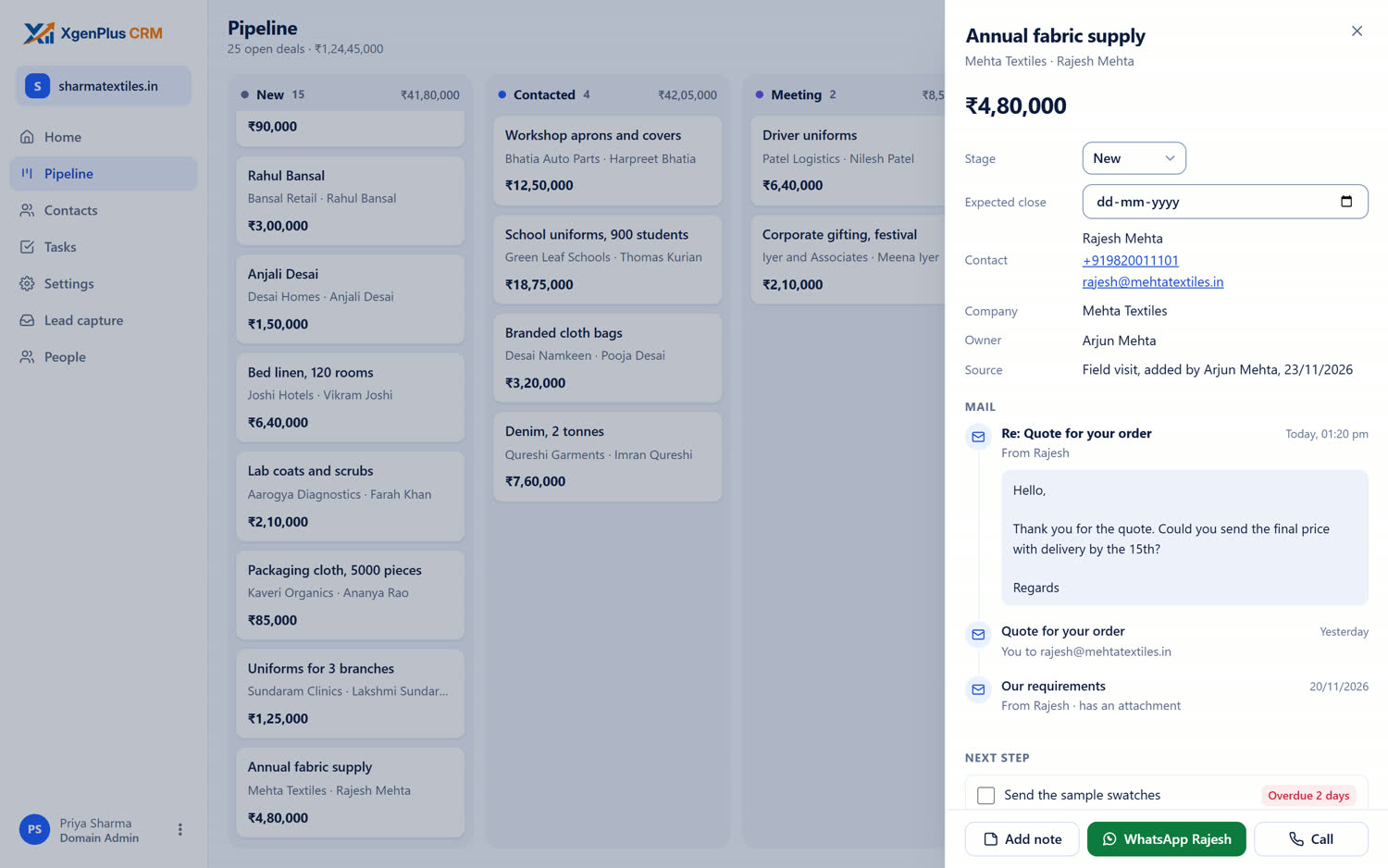
Open any deal and see everything about it in one place.

  • The contact, the value, where the lead came from, the notes and the timeline of what happened.
  • The emails you have exchanged with that person, if you connected your mailbox. CRM reads them. It does not send email.
  • A next step with a date. Overdue steps are marked on Home and in Tasks.
  • One tap to call the customer or open WhatsApp.

Next steps and follow-ups in the help centre

A deal opened beside the board, showing the emails with the customer, a dated next step and a notes box.
A deal with its emails, next step and notes.
Step 4

Win: move the deal to the finish line

Drag the deal from New to Contacted, Meeting, Proposal and Won, with a mouse, a finger or the keyboard.

  • Every move is saved at once, and Undo puts a card back if you slip.
  • Winning a deal gets a small celebration: the Won column lights up, its count goes up and a message names the amount and the customer.
  • Lost deals stay on record, so the board stays honest.

The pipeline board in the help centre

Press play (14 seconds): a deal is moved to Won.
Step 5

Learn: see what is working

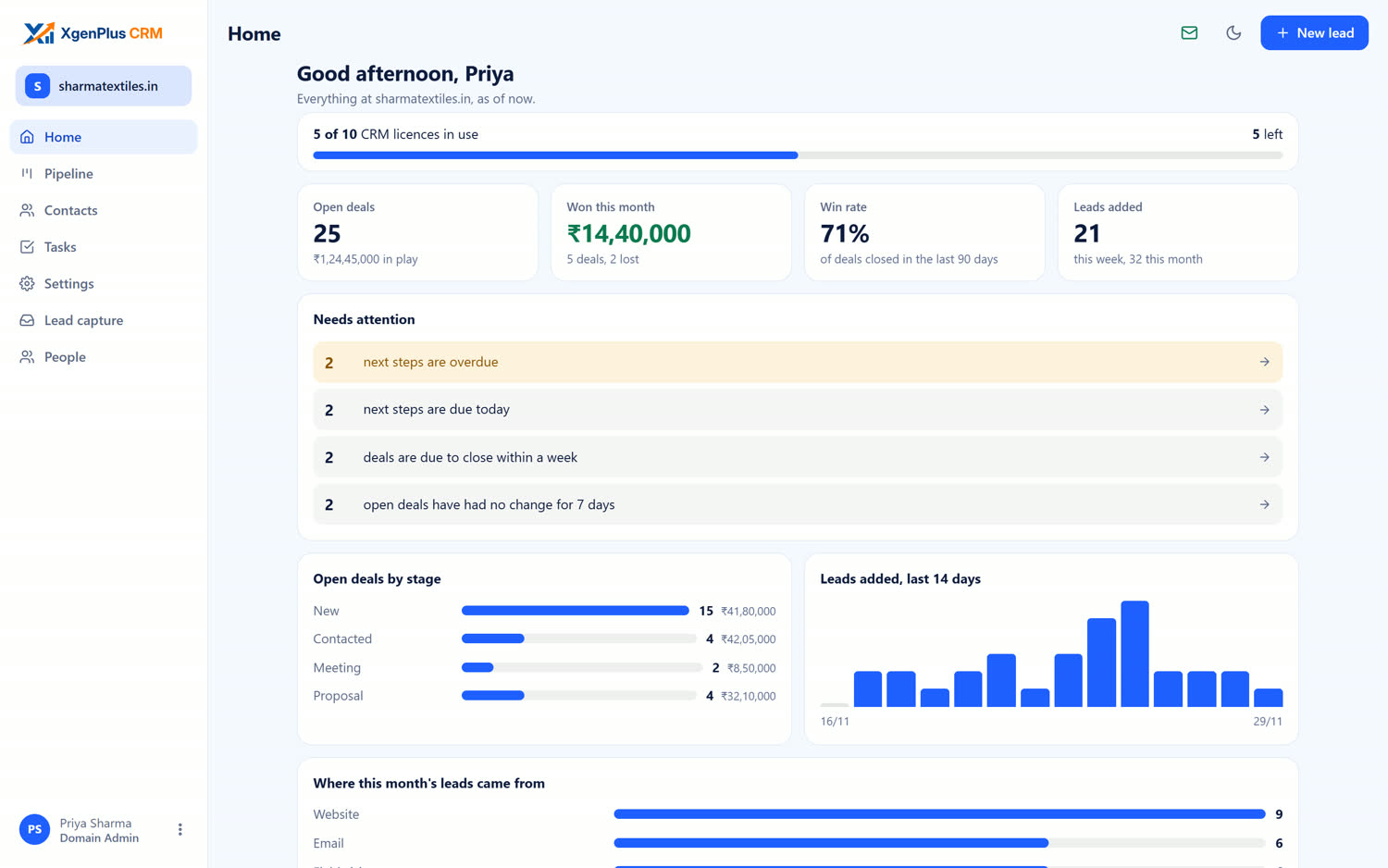
The Home screen answers the questions an owner asks every week.

  • Open deals and their value, deals won this month and your win rate.
  • Leads added this week and this month, and where this month's leads came from.
  • What needs attention: overdue steps, deals about to close and deals that have not moved for a week.
  • The Domain Admin also sees each person's numbers and how many licences are in use.

The owner dashboard in the help centre

The Home screen with open deals, won this month, win rate, what needs attention, deals by stage and where leads came from.
Home: the weekly picture on one screen.

A day with XgenPlus CRM

Three people at the same company, using the same board in different ways.

The owner, ten minutes in the morning

Priya runs Sharma Textiles. At 9:30 she opens Home. Overnight, three leads came in from the website and one from Facebook, shared in turn among her sales people. Two next steps are overdue, so she taps the line and sees that Arjun still owes a customer the sample swatches. She messages him, glances at where this month's leads came from, and moves on. She never opened a spreadsheet.

The sales rep in the office

Neha starts on Tasks: three follow-ups are due today. She opens the first deal and the emails with the customer are already there, so she does not search her inbox. She sends the price list from her mailbox as usual, adds a note, and sets the next step for Friday. When the customer agrees to a meeting, she drags the deal from Contacted to Meeting.

The field agent on a phone

Rohit is visiting shops. Outside a boutique he taps the plus button, types a name and a number, and saves. There is no signal in the lane, and it does not matter: the lead waits on his phone and is sent when the signal returns. He taps the green WhatsApp button to send his catalogue. If a colleague had added the boutique already, he would have been warned, and would have opened the existing lead.

How different businesses use it

The six stages are the same for everyone: New, Contacted, Meeting, Proposal, Won and Lost. Each business simply decides what they mean for its own work. The companies in these pictures are invented.

Field sales and distributors

A textile distributor with reps on the road

Leads come from shop visits, trade fairs and calls. Before CRM they lived in notebooks and WhatsApp, and left with the rep.

  • Reps add leads on the spot from the phone and tag them as a field visit.
  • Choose the Field Agent role for people who should see only their own leads.
  • Web leads go to the pool, or round robin among the reps who cover the web.
  • Import the existing customer list from a spreadsheet on day one.
New
Lead added
Contacted
First call or visit
Meeting
Sample or demo planned
Proposal
Price quoted
Won
Order received
Lost
Went elsewhere

Numbers to watch: leads added each week, deals by stage, and deals with no change for 7 days.

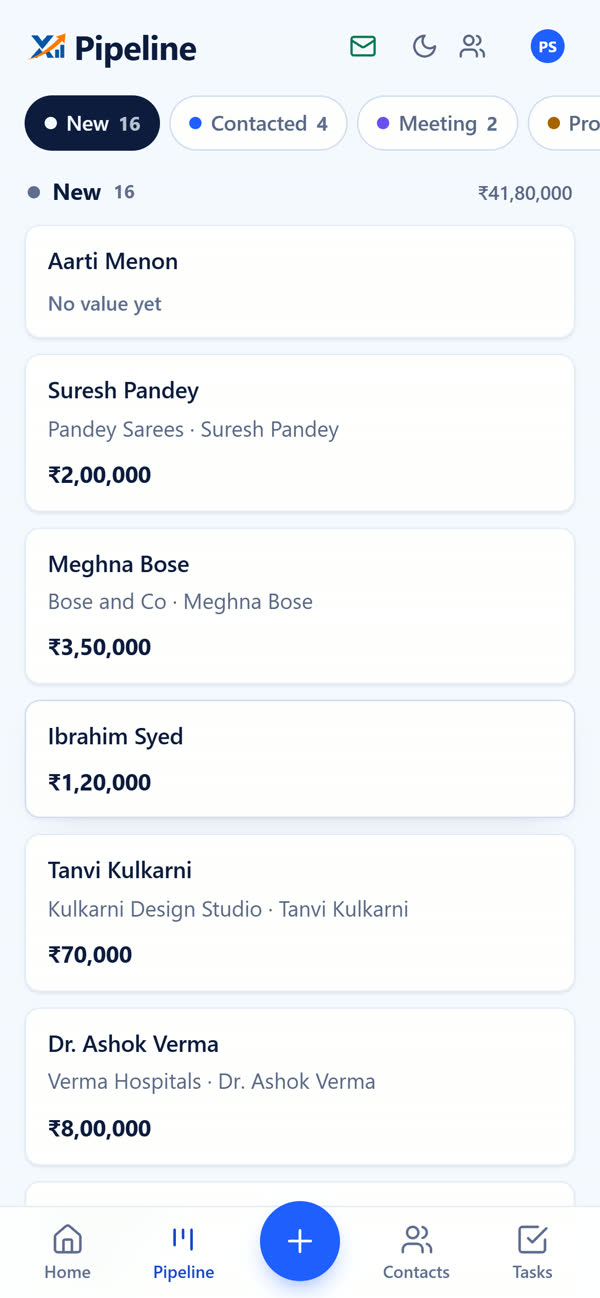
The pipeline on a phone with the stages along the top.
The quick add form on a phone.
Schools and coaching institutes

A coaching institute with three counsellors

Parents enquire through ads, the website and calls at all hours. Counsellors lose track of who was called, and a parent who asked twice gets two calls.

  • Add your own questions to the form: which exam, which class, best time to call.
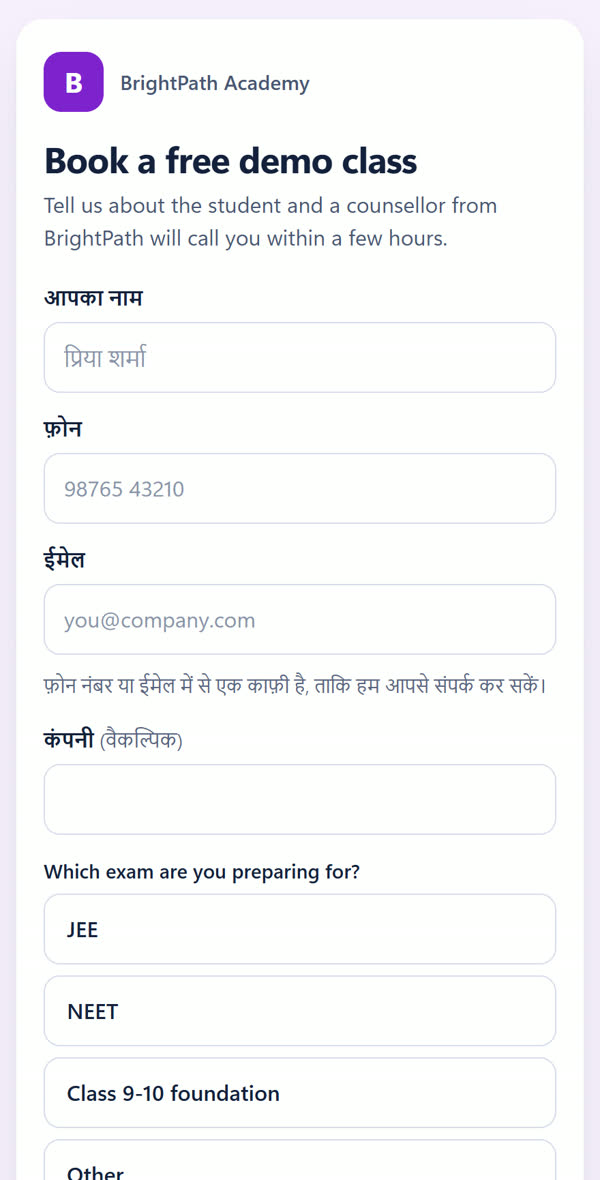
  • Show the form in Hindi, Gujarati or Bengali if parents prefer it.
  • Share new leads in turn among the counsellors, with an email alert to whoever gets one.
  • Import last year's enquiries so past parents are not treated as new.
New
Enquiry received
Contacted
Spoken to the parent
Meeting
Campus visit or demo class
Proposal
Fee structure sent
Won
Admitted
Lost
Chose another institute

Numbers to watch: leads by source, win rate, and new leads per day after an ad starts.

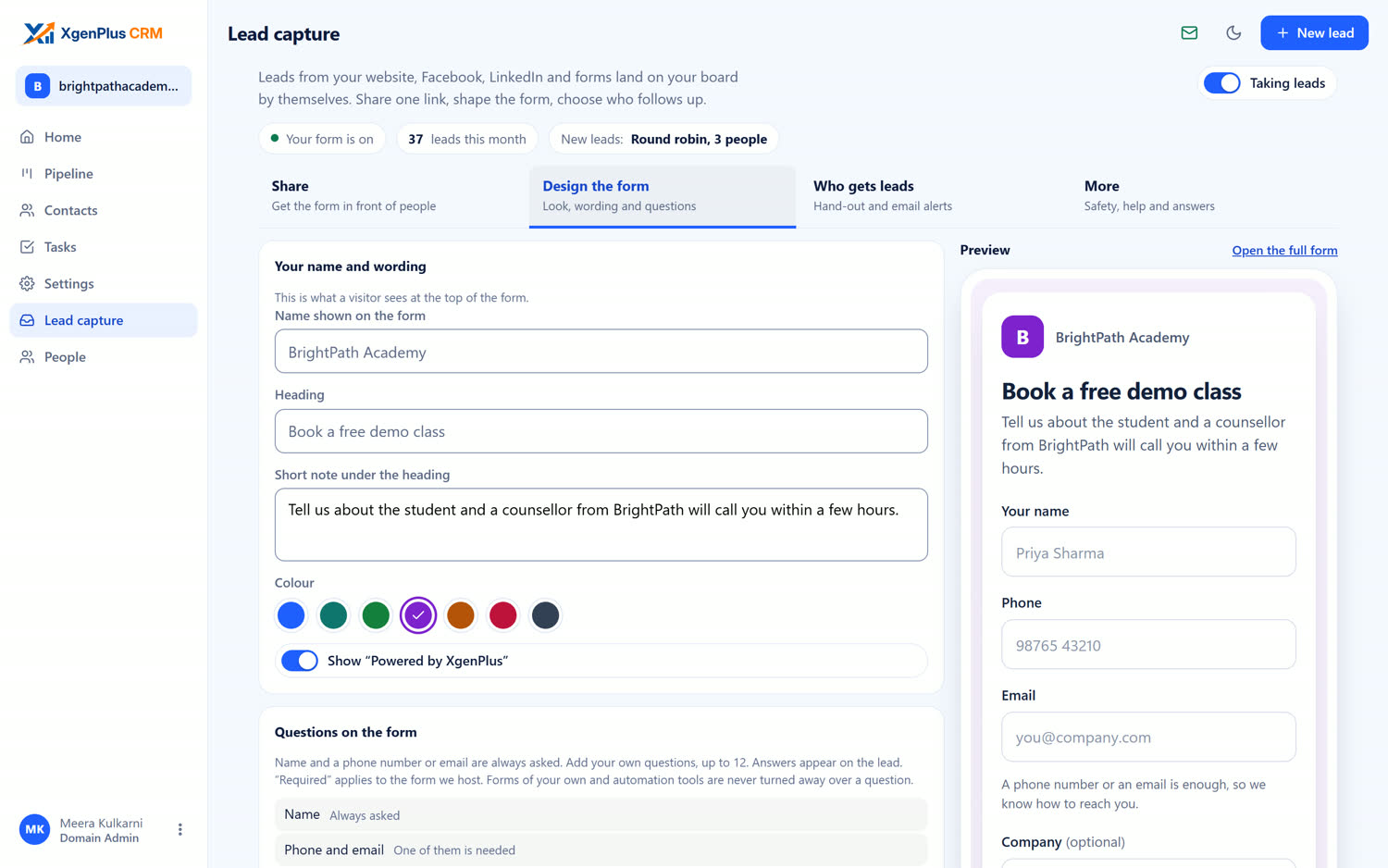
Designing the lead form for BrightPath Academy with a live preview and the questions about the exam and class.
BrightPath Academy designing its form, with a live preview.
The BrightPath Academy lead form in Hindi on a phone.
Real estate, travel and other high-volume lead businesses

A property agency running Facebook and Google ads

Hundreds of enquiries, few serious buyers, and the first agent to reach a buyer usually wins. The owner wants to know which ads bring buyers, not just clicks.

  • Connect each ad through Zapier, Make or n8n, so every lead carries its source: Facebook, Instagram, Google or LinkedIn.
  • Ask qualifying questions: buy or rent, budget, location.
  • Round robin with an email alert puts each lead in an agent's hands within moments.
  • Agents tap WhatsApp or Call straight from the lead.
  • Allow only your own websites to send leads from a browser, to keep junk out.
New
Lead in
Contacted
Buyer reached
Meeting
Site visit booked
Proposal
Offer shared
Won
Booked
Lost
Not interested

Numbers to watch: leads and wins by source, and how full the New stage is.

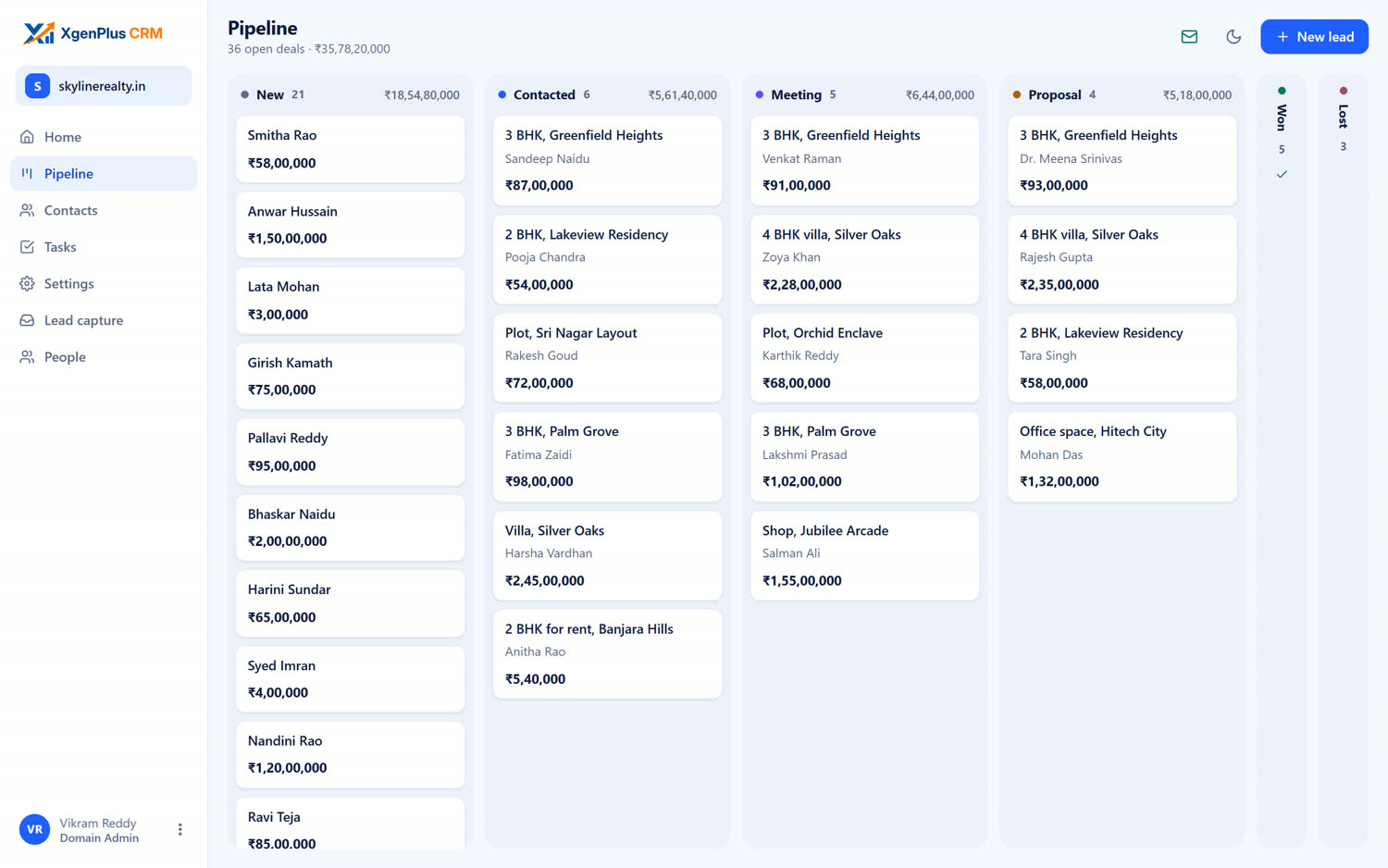
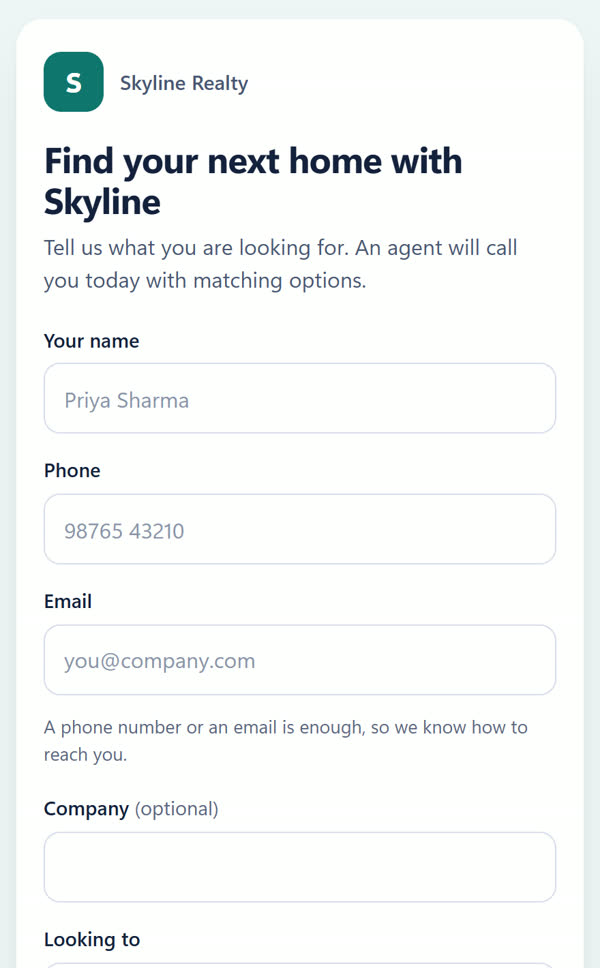
Skyline Realty's pipeline with homes and plots in lakhs and crores across the stages.
Skyline Realty's pipeline.
Skyline Realty's lead form on a phone asking whether the visitor wants to buy, rent or invest.
Consultants, accountants and IT services

An IT services firm winning large projects

Deals are few, large and long, and most of the story lives in email. Proposals go out, then silence, and nobody remembers to follow up.

  • Everyone connects their mailbox, so the emails with each client show inside the deal.
  • The website form asks what the client needs and a rough budget.
  • The managing partner reads each new lead and assigns it, using the pool.
  • Every proposal gets a dated next step, so silence is caught.
New
Referral or enquiry
Contacted
First call
Meeting
Discovery meeting
Proposal
Proposal sent
Won
Signed
Lost
No decision

Numbers to watch: value in the Proposal stage, win rate, and proposals with no next step.

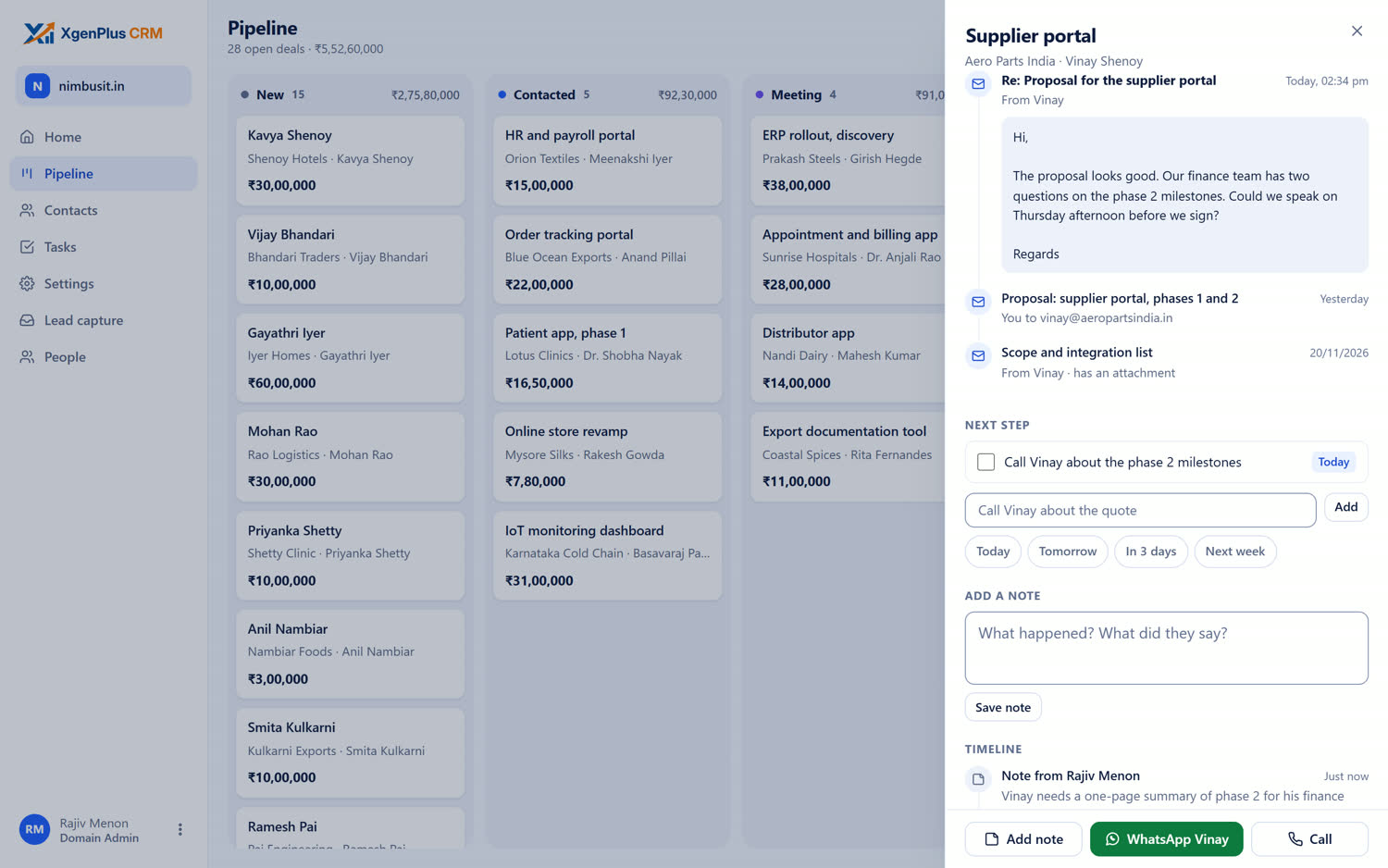
Nimbus Technologies' pipeline with a deal opened to show its emails, next step and note.
Nimbus Technologies: a proposal deal with its emails and next step.
Exporters and growing manufacturers

A garment exporter selling in dollars

Fewer, bigger deals, longer cycles and a team across time zones. Management wants a reliable view of pipeline value.

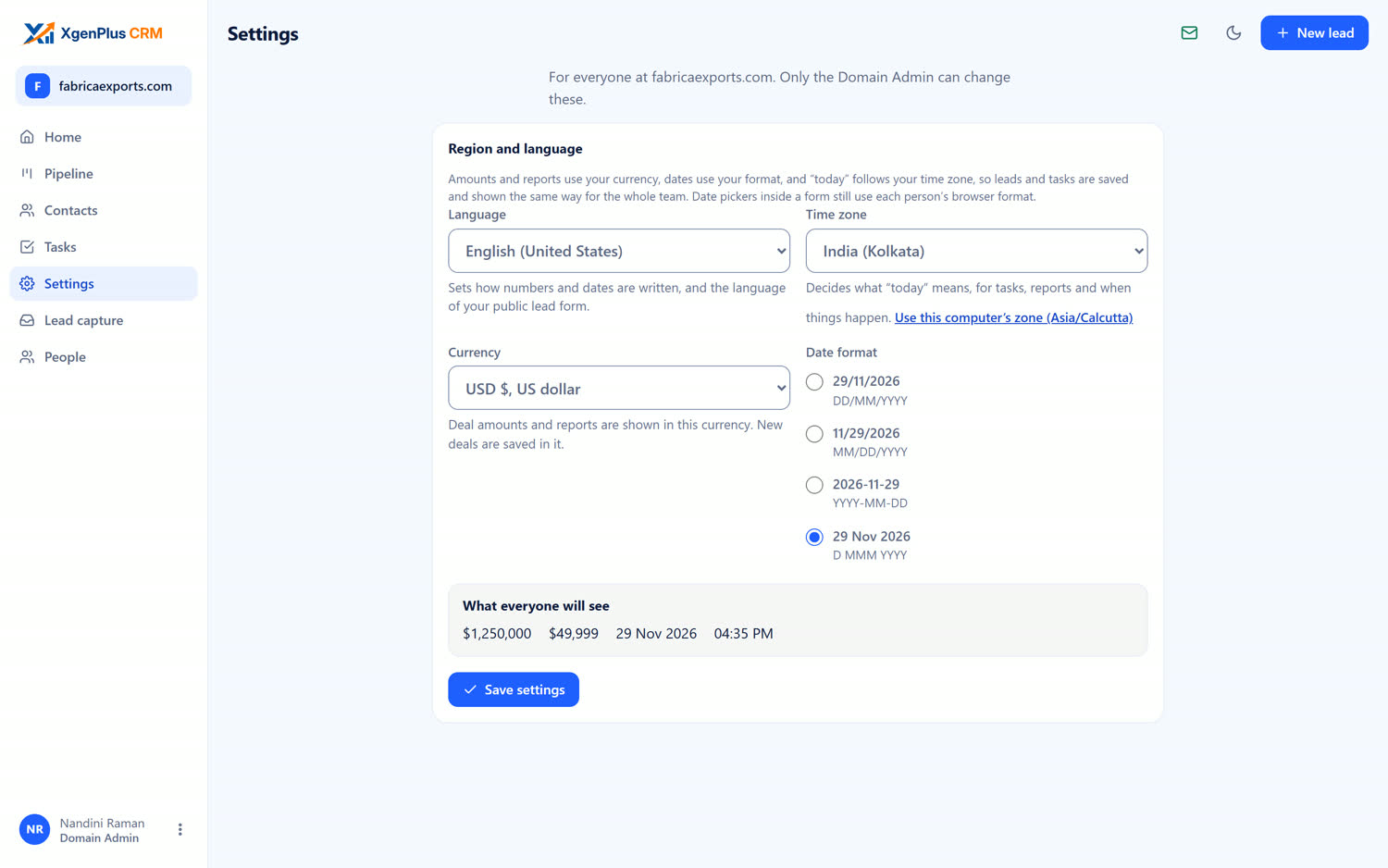
  • The Domain Admin sets the currency, time zone, date format and language once, for everyone.
  • A Sales Manager sees all deals, reps own their accounts, and a Viewer role lets finance and directors look without changing anything.
  • Group people into teams, with a Team Lead who sees their team's deals.
  • Use the totals by stage as the forecast conversation.
New
Inquiry
Contacted
Introduced, samples offered
Meeting
Video call or fair
Proposal
Quotation or sample order
Won
Order confirmed
Lost
Lost on price or timing

Numbers to watch: value in the Proposal stage, won this month, and win rate.

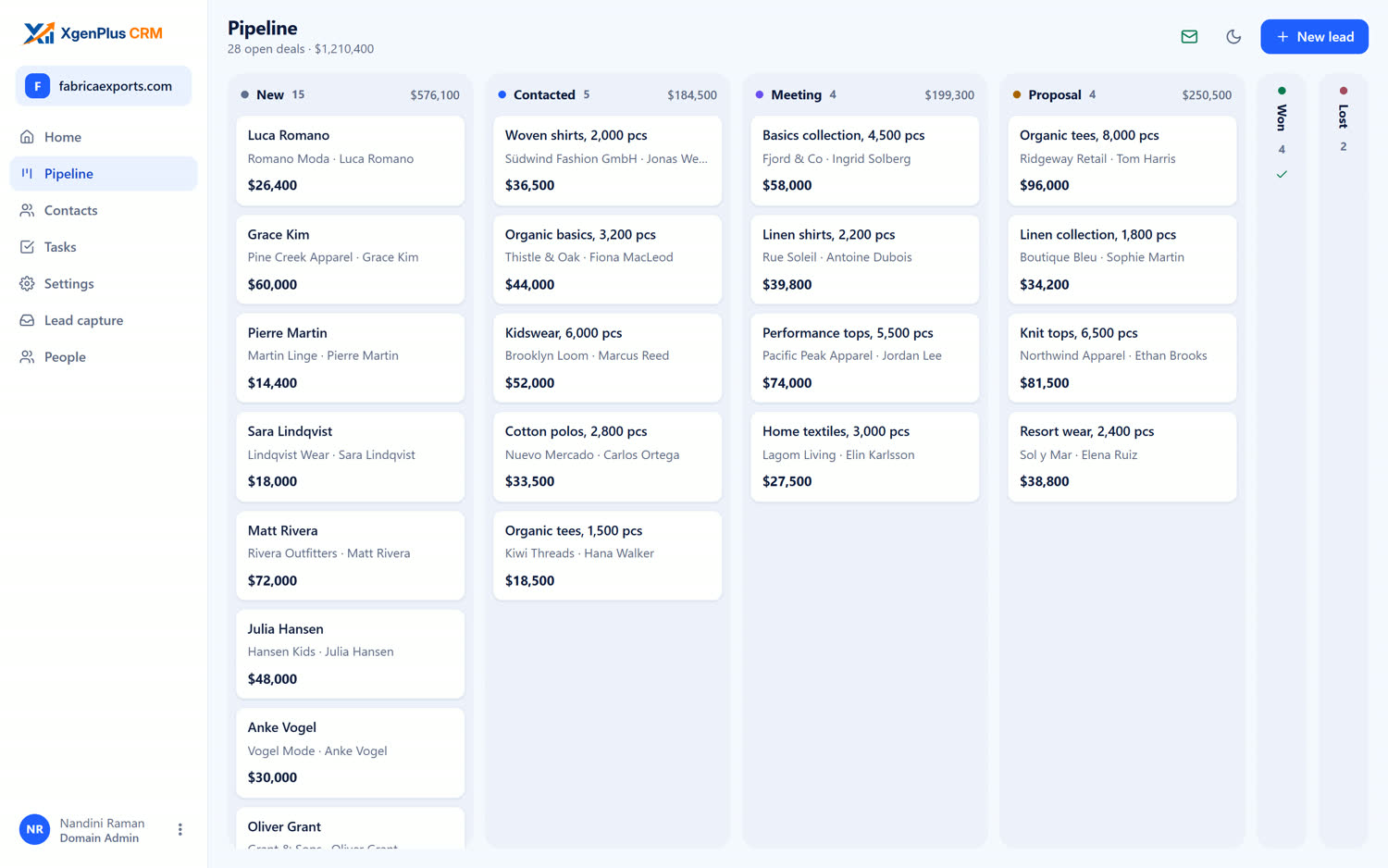
Fabrica Exports' pipeline with deal values in US dollars.
Fabrica Exports: the pipeline in dollars.
Region settings with language, time zone, currency and date format, and a preview of what everyone will see.
Region settings, chosen once for the whole company.

Set up your company in about an hour

The Domain Admin does this once. After that, each person needs about a minute to sign in. Before you start, decide who owns new leads, what each stage means for your business and which three numbers you want to watch.

First-time setup in the help centre

  1. Sign in and choose your region

    Use your XgenPlus email and the code from the app. You are asked once for language, time zone, date format and currency, and these apply to everyone. About 5 minutes.

  2. Add your first lead

    Use New lead once, to see how it feels. About 2 minutes.

  3. Bring your list

    Upload your contacts as a CSV file. CRM checks the file and shows who is new and who is already in before it saves anything. About 10 minutes.

  4. Open Lead capture

    Make the form yours with a name, heading, colour and your own questions. Then share the link and try the form yourself. About 15 minutes.

  5. Choose who gets leads

    Pick the pool or round robin, and switch on the email alert if you want one. The alert is sent from the Domain Admin's own mailbox. About 5 minutes.

  6. Set roles and teams

    Give each person a built-in role, or make your own. About 10 minutes.

  7. Connect your mailbox, if you want emails inside deals

    This is optional. About 5 minutes.

  8. Tell your team

    From People, send a short email saying CRM is ready and how to sign in. About 3 minutes.

Who sees what, and who gets which lead

Roles decide what a person can do and whose records they see. You can change the built-in roles or make your own.

RoleSeesTypical person
Domain AdminEverything, and manages roles, teams, region and lead captureThe owner
Sales ManagerEveryone's records, and can hand over workHead of sales
Team LeadTheir own and the teams they leadA regional lead
Sales RepEveryone's records by defaultA salesperson
Field AgentOnly their ownA rep on the road
ViewerEveryone's records, changes nothingFinance or directors

Choosing how new leads are handed out

IfChoose
A manager reads each lead before it goes to a personAdmin pool. Nothing is assigned until the manager decides.
Speed matters and every rep can handle any leadRound robin. Each lead goes to the next person in turn.
Only some people handle web leadsRound robin among the people you choose. Everyone else is left out.

Licences, joiners and leavers

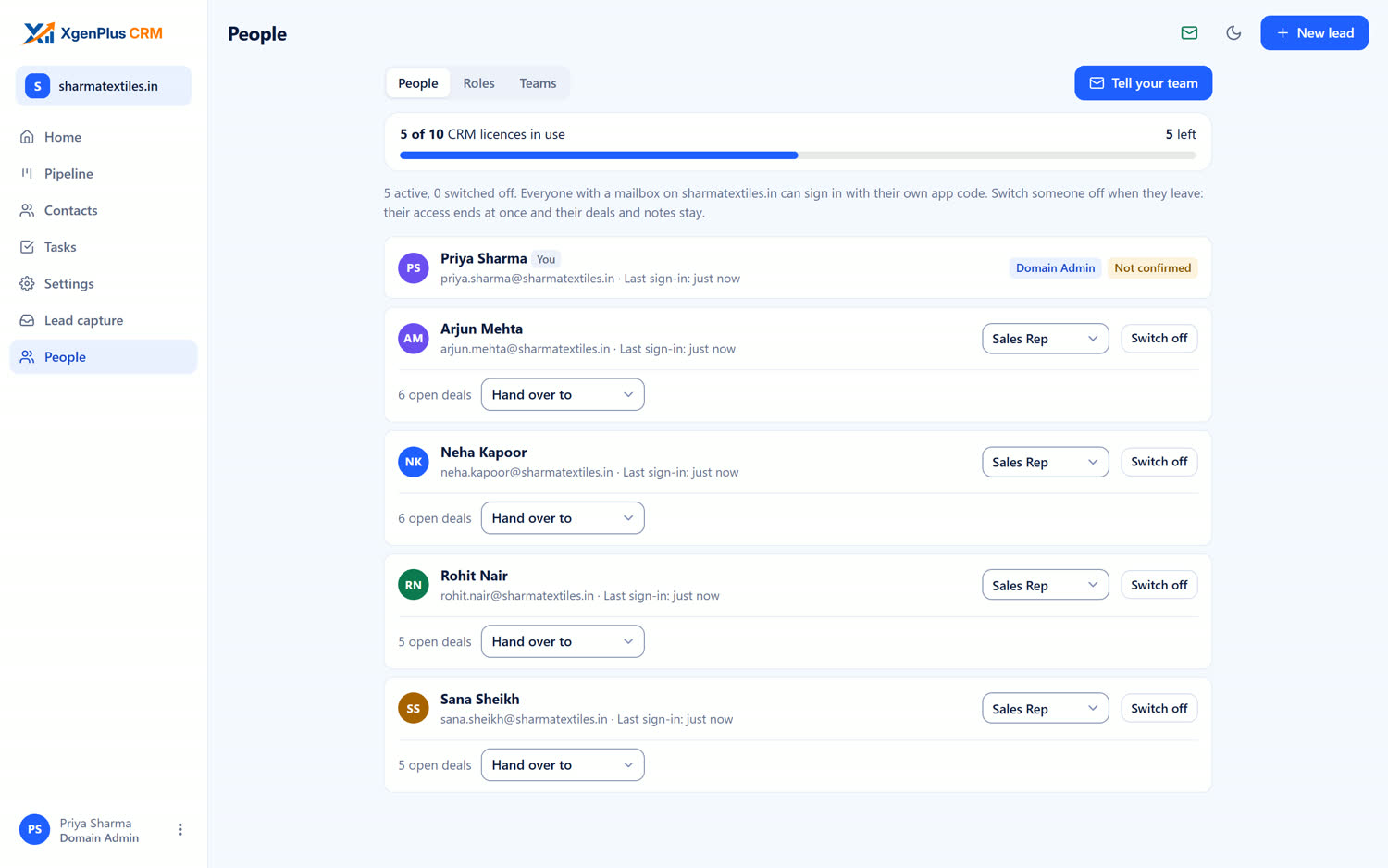
  • The number of people who can use CRM follows the Xgen Enterprise licences on your domain. Home and People show how many are in use and how many are left.
  • Leads, contacts and deals never use a licence. Only people who sign in do.
  • A new joiner signs in with their own email and app code. If all licences are in use, they are told to ask the Domain Admin.
  • When someone leaves, switch them off in People. Their access ends at once, a licence is freed, and their open deals go to a colleague.
The People screen showing each person's role and the number of licences in use and left.
People: roles and licences in use.

Habits that make a CRM stick

These are suggestions, not rules. A small routine in the first month matters more than any setting.

  1. Week 1: every enquiry becomes a lead

    No lead lives only in a notebook or a chat. Give every open deal a next step with a date, and review the Contacted and Proposal stages with that one question.

  2. Week 2: five minutes a day, fifteen a week

    Each person opens Tasks first thing and clears what is due. Once a week, the manager opens Home and walks through what needs attention.

  3. Week 3: tidy the board

    Move dead deals to Lost, so the value of the pipeline means something. Name deals in one style, such as "School uniforms, 900 students", and put the customer in the company field.

  4. Week 4: look at the sources

    Which channel brought the wins, not only the leads? Decide where to spend next month's effort.

What CRM does not do

So there are no surprises.

  • It does not send email from a deal. It shows your emails with each customer, and you keep writing in your XgenPlus mailbox.
  • It does not send WhatsApp messages. The WhatsApp button opens WhatsApp with the customer's number ready.
  • The six stages are fixed. Map your own process onto them, as the examples above do.
  • It has no automation builder and no forecasting. Use the totals by stage as a guide.
  • The CRM screens are in English. The public lead form can also be shown in Hindi, Gujarati or Bengali.

The full list in the help centre

Questions about getting started

How long does setup take?

About an hour for the Domain Admin, and about a minute for each person to sign in.

Do we need to install anything?

No. CRM runs in the browser on computers, tablets and phones.

Can our whole team use it?

Yes, up to the number of Xgen Enterprise licences on your domain. The Domain Admin can see how many are in use and how many are left.

Will it replace our spreadsheet?

Yes. Import your list as a CSV file in a few minutes and see it on a board.

Can we change the stages?

The six stages are fixed. Map your own process onto them. The examples above show how.

What if a salesperson leaves?

Switch them off in People. Their access ends at once, and you can hand their open deals to a colleague.

Is our data private?

Each company sees only its own data, and you decide who sees what with roles. Read how CRM protects it.

We sell abroad. Can we use dollars or euros?

Yes. The Domain Admin chooses the currency once for the company. Changing it later asks for confirmation and never converts amounts.

See all questions and answers

Bring your customers next to your email

CRM is included with Xgen Enterprise and Enterprise Pro. Sign in with your XgenPlus email and the code from the app.